> ## Documentation Index
> Fetch the complete documentation index at: https://docs.layerswap.io/llms.txt
> Use this file to discover all available pages before exploring further.
# Easy Deposit
> Give users a deposit address they can pay to from any wallet, app, or exchange — no WalletConnect or browser extension required on the source side.
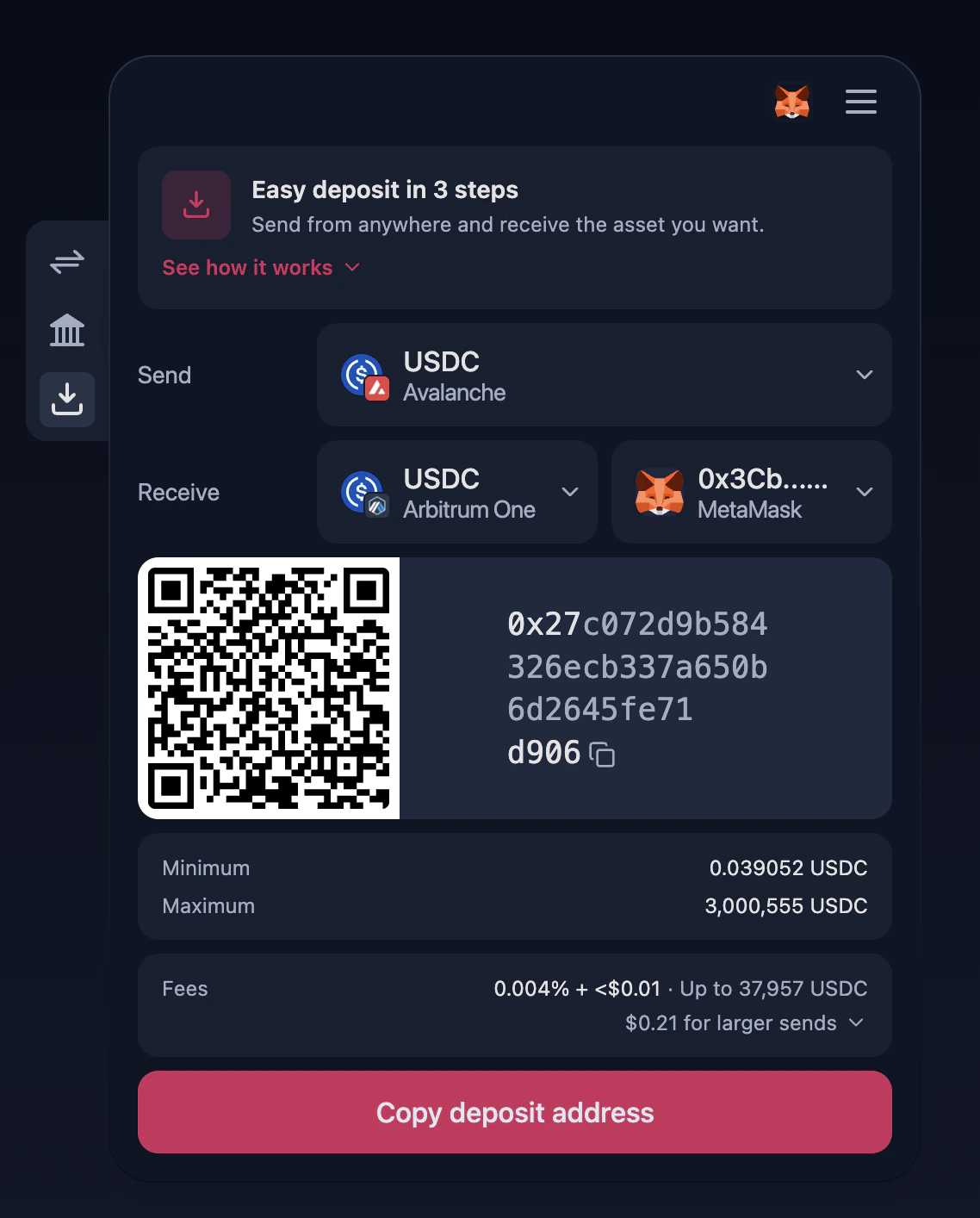 The **Easy Deposit** tab is a streamlined flow that lets a user fund a swap by sending to a generated deposit address — no WalletConnect, no browser-extension popup, and no source-side wallet integration required.
The user picks what they're sending, what they want to receive and where, and the widget shows a QR code and a copyable deposit address. They can pay from any wallet app, a hardware wallet, or directly from an exchange account.
## When to use it
* You want a deposit-by-address UX that works on mobile and from any wallet, with no source-side WalletConnect dance.
* Your users primarily send from exchange or wallet apps directly.
* You want to support source networks where you don't ship a wallet adapter in your integration.
## How it works
1. The user picks a **Send** network/token (what they'll be paying with).
2. The user picks a **Receive** network/token. The recipient address is taken from the connected destination wallet — it can't be supplied via config or query parameters in this flow.
3. The widget displays the deposit address (with QR code), min/max, and fee preview.
4. The user sends from any wallet of their choice. Once the deposit lands, the swap is processed and funds arrive at the destination.
A wallet is required on the destination side — the recipient address is read from the connected wallet, not from `destAddress` or any other parameter. The connect modal is opened automatically when the user lands on this tab without any wallet connected.
## Enabling the tab
Set `defaultTab: 'deposit'` to open the widget on the Easy Deposit flow:
```typescript theme={null}
import { LayerswapProvider, Swap } from '@layerswap/widget';
import { createEVMProvider } from '@layerswap/wallet-evm';
export default function App() {
return (
);
}
```
## Configuration
Set to `'deposit'` to open the Easy Deposit flow on first render.
Source blockchain network the user will be sending from (e.g., `'BITCOIN_MAINNET'`, `'ETHEREUM_MAINNET'`, `'ZKSYNC_MAINNET'`).
Destination blockchain network where funds will be received.
Token the user will be sending from the source network.
Token to be received on the destination network.
`destAddress` is **not** honored in the Easy Deposit flow — the recipient address is always sourced from the connected destination wallet. Use the Swap or Deposit from CEX flows if you need to pre-fill a destination address.
### Locking the widget to Easy Deposit only
To restrict the widget to the Easy Deposit flow and hide the tab switcher, combine `defaultTab` with `header.hideTabs: true`:
```typescript theme={null}
```
See [Tab Options](/integration/UI/Widget/TabOptions) for the full list of `defaultTab` values and the other available flows.
The **Easy Deposit** tab is a streamlined flow that lets a user fund a swap by sending to a generated deposit address — no WalletConnect, no browser-extension popup, and no source-side wallet integration required.
The user picks what they're sending, what they want to receive and where, and the widget shows a QR code and a copyable deposit address. They can pay from any wallet app, a hardware wallet, or directly from an exchange account.
## When to use it
* You want a deposit-by-address UX that works on mobile and from any wallet, with no source-side WalletConnect dance.
* Your users primarily send from exchange or wallet apps directly.
* You want to support source networks where you don't ship a wallet adapter in your integration.
## How it works
1. The user picks a **Send** network/token (what they'll be paying with).
2. The user picks a **Receive** network/token. The recipient address is taken from the connected destination wallet — it can't be supplied via config or query parameters in this flow.
3. The widget displays the deposit address (with QR code), min/max, and fee preview.
4. The user sends from any wallet of their choice. Once the deposit lands, the swap is processed and funds arrive at the destination.
A wallet is required on the destination side — the recipient address is read from the connected wallet, not from `destAddress` or any other parameter. The connect modal is opened automatically when the user lands on this tab without any wallet connected.
## Enabling the tab
Set `defaultTab: 'deposit'` to open the widget on the Easy Deposit flow:
```typescript theme={null}
import { LayerswapProvider, Swap } from '@layerswap/widget';
import { createEVMProvider } from '@layerswap/wallet-evm';
export default function App() {
return (
);
}
```
## Configuration
Set to `'deposit'` to open the Easy Deposit flow on first render.
Source blockchain network the user will be sending from (e.g., `'BITCOIN_MAINNET'`, `'ETHEREUM_MAINNET'`, `'ZKSYNC_MAINNET'`).
Destination blockchain network where funds will be received.
Token the user will be sending from the source network.
Token to be received on the destination network.
`destAddress` is **not** honored in the Easy Deposit flow — the recipient address is always sourced from the connected destination wallet. Use the Swap or Deposit from CEX flows if you need to pre-fill a destination address.
### Locking the widget to Easy Deposit only
To restrict the widget to the Easy Deposit flow and hide the tab switcher, combine `defaultTab` with `header.hideTabs: true`:
```typescript theme={null}
```
See [Tab Options](/integration/UI/Widget/TabOptions) for the full list of `defaultTab` values and the other available flows.